
Designing Buildings Anywhere от Designing Buildings
Look up construction terms direct from any website
3 пользователя3 пользователя
Метаданные расширения
Скриншоты

Об этом расширении
Want to look up construction industry terminology without leaving the website you're on?
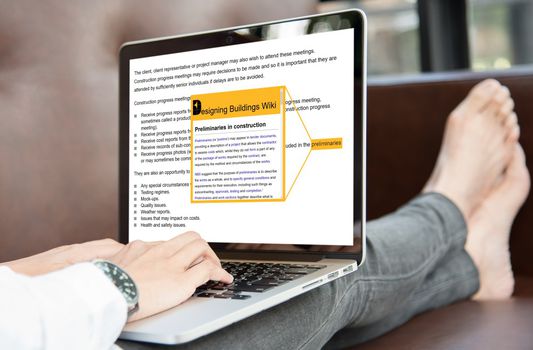
This easy-to-use add-on for the Firefox browser gives you instant access to 20,000 definitions, explanations and acronyms on Designing Buildings Wiki while you’re browsing. Simply highlight construction terms on any website and a window will pop up explaining what they are.
Designing Buildings Anywhere takes less than a minute to add to Firefox. Try it now.
Instructions
- Open the Firefox browser, or download it if you don't already have it from https://www.mozilla.org/en-GB/firefox/new/
- Go to the Designing Buildings Anywhere page in the Firefox add-ons store and click 'Add to Firefox'. https://addons.mozilla.org/en-GB/firefox/addon/designing-buildings-anywhere/
- Give the add-on permission.
- The Designing Buildings icon will appear in the Firefox toolbar.
Open a new browser window or restart Firefox to activate the add-on.
- Now go to any website, highlight any text and it will be looked up on Designing Buildings Wiki.
- If there's a match the page will open in a pop-up window, if there isn't a match, search results will open. If there's no page match and you want to create the page, click on 'Click here to create the page'.
- If you want to open the page in the pop-up window in a new window, click the orange Designing Buildings Wiki header bar at the top of the pop-up window.
- To close the pop-up window, click anywhere else on the screen.
- To disable the add-on, click on the Designing Buildings icon in the Firefox toolbar and then untick 'Enable Lookup'. The icon will grey out.
- To re-enable the add-on, click on the Designing Buildings icon in the Firefox toolbar and click 'Enable Lookup'. The icon will appear in black.
Designing Buildings Anywhere works on the Firefox browser for desktop and laptop devices. It does not work on mobile devices or tablets as these do not operate the full version of Firefox.
Find out more at: https://www.designingbuildings.co.uk/wiki/Designing_Buildings_Anywhere
This add on is developed from the Pop-Up Dictionary extension by R Leung https://addons.mozilla.org/en-GB/firefox/user/10210242/
Changelog
0.2.7
- Fixed an issue when clicking on the DB header and the opened tab would not allow form submissions due to the iframe sandbox. Additional options added to allow.
This easy-to-use add-on for the Firefox browser gives you instant access to 20,000 definitions, explanations and acronyms on Designing Buildings Wiki while you’re browsing. Simply highlight construction terms on any website and a window will pop up explaining what they are.
Designing Buildings Anywhere takes less than a minute to add to Firefox. Try it now.
Instructions
- Open the Firefox browser, or download it if you don't already have it from https://www.mozilla.org/en-GB/firefox/new/
- Go to the Designing Buildings Anywhere page in the Firefox add-ons store and click 'Add to Firefox'. https://addons.mozilla.org/en-GB/firefox/addon/designing-buildings-anywhere/
- Give the add-on permission.
- The Designing Buildings icon will appear in the Firefox toolbar.
Open a new browser window or restart Firefox to activate the add-on.
- Now go to any website, highlight any text and it will be looked up on Designing Buildings Wiki.
- If there's a match the page will open in a pop-up window, if there isn't a match, search results will open. If there's no page match and you want to create the page, click on 'Click here to create the page'.
- If you want to open the page in the pop-up window in a new window, click the orange Designing Buildings Wiki header bar at the top of the pop-up window.
- To close the pop-up window, click anywhere else on the screen.
- To disable the add-on, click on the Designing Buildings icon in the Firefox toolbar and then untick 'Enable Lookup'. The icon will grey out.
- To re-enable the add-on, click on the Designing Buildings icon in the Firefox toolbar and click 'Enable Lookup'. The icon will appear in black.
Designing Buildings Anywhere works on the Firefox browser for desktop and laptop devices. It does not work on mobile devices or tablets as these do not operate the full version of Firefox.
Find out more at: https://www.designingbuildings.co.uk/wiki/Designing_Buildings_Anywhere
This add on is developed from the Pop-Up Dictionary extension by R Leung https://addons.mozilla.org/en-GB/firefox/user/10210242/
Changelog
0.2.7
- Fixed an issue when clicking on the DB header and the opened tab would not allow form submissions due to the iframe sandbox. Additional options added to allow.
Оценено 4 рецензентами на 5
Разрешения и данные
Больше сведений
- Ссылки дополнения
- Версия
- 0.2.7
- Размер
- 37,39 КБ
- Последнее обновление
- 6 лет назад (9 апр. 2020 г.)
- Связанные категории
- Лицензия
- Публичная лицензия Mozilla 2.0
- История версий
- Добавить в подборку