
Сохранить голос ChatGpt от extsdev
Сохраните аудио голоса ChatGpt на ваш компьютер
131 пользователь131 пользователь
Метаданные расширения
Скриншоты
Об этом расширении
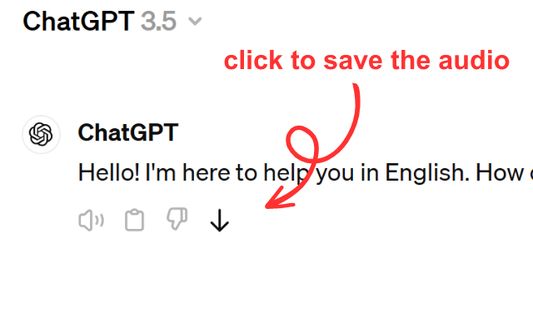
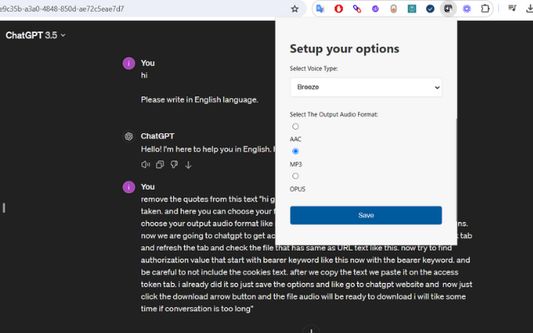
Save ChatGPT voice responses directly to your computer with a single click. This add-on adds a convenient download button next to ChatGPT's voice messages, allowing you to save the audio in your preferred format (AAC, MP3, or OPUS) and voice type. Perfect for language learners, content creators, or anyone who wants to revisit ChatGPT's spoken responses offline.
The extension is lightweight and integrates seamlessly with ChatGPT's interface. Simply click the download icon that appears next to voice messages to save them to your computer. You can customize your preferred voice type and audio format through the extension's options. Supports multiple languages and works on any ChatGPT conversation that includes voice responses.
The extension is lightweight and integrates seamlessly with ChatGPT's interface. Simply click the download icon that appears next to voice messages to save them to your computer. You can customize your preferred voice type and audio format through the extension's options. Supports multiple languages and works on any ChatGPT conversation that includes voice responses.
Оценено 1 рецензентом на 5
Разрешения и данные
Требуемые разрешения:
- Скачивать файлы, а также читать и изменять историю скачиваний браузера
- Получать доступ к вашим данных на сайтах в chatgpt.com домене
Опциональные разрешения:
- Получать доступ к вашим данных на chatgpt.com
Больше сведений
- Ссылки дополнения
- Версия
- 1.0.0
- Размер
- 62,64 КБ
- Последнее обновление
- год назад (9 апр. 2025 г.)
- Лицензия
- Лицензия MIT
- История версий
- Добавить в подборку