Дополнения для браузера Firefox
  • Расширения
  • Темы
    • для Firefox
    • Словари и языковые пакеты
    • Другие версии браузера
    • Дополнения для Android
Войти
Предпросмотр Take Youtube Video Screenshots (+ GIF Maker)

Take Youtube Video Screenshots (+ GIF Maker) от znwyrz

How to use - Download File : Left Click on Button - Download File with Prompt : Alt/Option + Left Click on Button - Copy to Clipboard : Shift + Left Click on Button - Selecting the Capture Area: Ctrl/Command + Left Click on Button

4.6 (38 отзывов)4.6 (38 отзывов)
596 пользователей596 пользователей
Скачать Firefox и установить расширение
Скачать файл

Метаданные расширения

Скриншоты
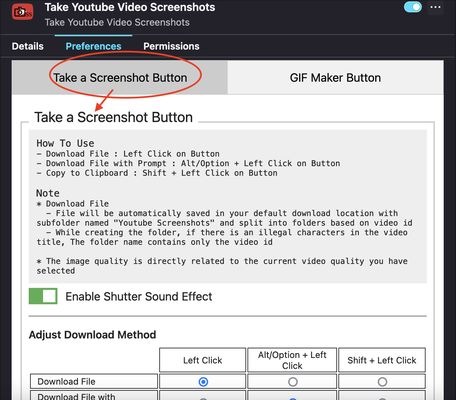
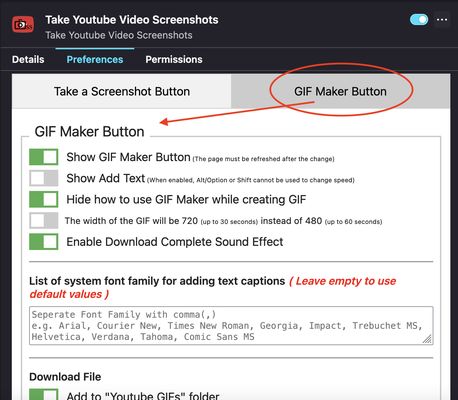
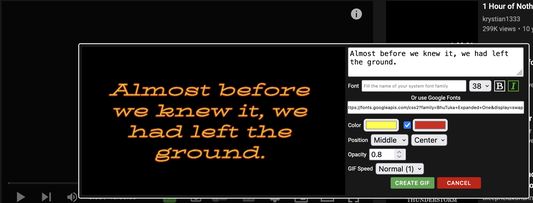
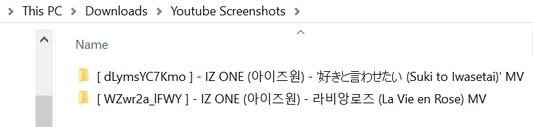
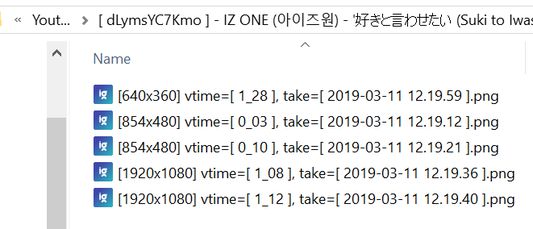
Add button to video toolbarAdd-on Preferences - Take a Screenshot ButtonAdd-on Preferences - GIF Maker ButtonGIF Maker Add Caption text PreviewSplit screenshot into folders based on video id and video titleFilename based on resolution, video time, current date and time
Об этом расширении
A toolbar button for easier take youtube video screenshots.

How to use
- Download File : Left Click on Button
- Download File with Prompt : Alt/Option + Left Click on Button
- Copy to Clipboard : Shift + Left Click on Button
- Selecting the Capture Area: Ctrl/Command + Left Click on Button
* For "Selecting the Capture Area" when rotating video or entering and exiting fullscreen mode, you should close the selection box first and open it again. Due to changes in the size of the video and the player, the previous code specifying the size of the area that can be dragged must be changed
* "Download File" / "Download File with Prompt" / "Copy to Clipboard" can be done on the capture button of "Selecting the Capture Area" with the same shortcuts
* Shutter sound can be disabled in the add-on Preferences
* Download Method can be adjust in the add-on Prefereces
* Added "GIF Maker" button to create simple GIFs

Note
* Download File
  - File will be automatically saved in your default download location with subfolder named "Youtube Screenshots" and split into folders based on video id
  - While creating the folder, if there is an illegal characters in the video title, The folder name contains only the video id
  • The image quality is directly related to the current video quality you have selected
If you want to create MPC-like "Save Thumbnails", try <a href="https://addons.mozilla.org/en-US/firefox/addon/youtube-storyboard/" target="_blank">this</a> add-on.
Оценено 38 рецензентами на 4,6
Войдите, чтобы оценить это расширение
Оценок пока нет

Рейтинг сохранён

5
32
4
3
3
0
2
0
1
3
Прочитать 38 отзывов
Разрешения и данные

Требуемые разрешения:

  • Скачивать файлы, а также читать и изменять историю скачиваний браузера
  • Мониторить использование расширений и управлять темами
  • Получать доступ ко вкладкам браузера
  • Получать доступ к вашим данных на www.youtube.com

Опциональные разрешения:

  • Получать доступ к вашим данных на www.youtube.com
Подробнее
Больше сведений
Ссылки дополнения
  • Страница поддержки
  • Copy add-on ID
Версия
3.0.6.0
Размер
272,03 КБ
Последнее обновление
7 месяцев назад (14 окт. 2025 г.)
Связанные категории
  • Управление скачиванием файлов
  • Фотографии, музыка и видео
  • Игры и развлечения
Лицензия
Custom LicenseCustom License for Take Youtube Video Screenshots (+ GIF Maker)
История версий
  • Просмотреть все версии
Добавить в подборку
Пожаловаться на это дополнение
Перейти на домашнюю страницу Mozilla

Дополнения

  • О сайте
  • Блог дополнений для Firefox
  • Мастерская расширений
  • Центр разработчика
  • Политики разработчика
  • Блог Сообщества
  • Форум
  • Сообщить об ошибке
  • Руководство по написанию отзывов

Браузеры

  • Desktop
  • Mobile
  • Enterprise

Продукты

  • Browsers
  • VPN
  • Relay
  • Monitor
  • Pocket
  • Bluesky (@firefox.com)
  • Instagram (Firefox)
  • YouTube (firefoxchannel)
  • Приватность
  • Куки
  • Юридическая информация

За исключением случаев, описанных здесь, содержимое этого сайта лицензировано на условиях лицензии Creative Commons «Атрибуция — На тех же условиях» версии 3.0 или любой более поздней версии.