
download chatgpt audio voice av extsdev
Save the ChatGpt voice audio to your computer
140 användare140 användare
Metadata för tillägg
Skärmbilder
Om detta tillägg
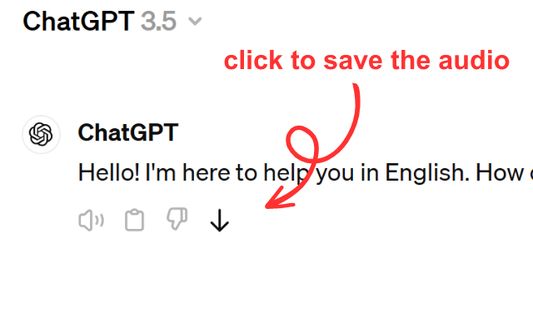
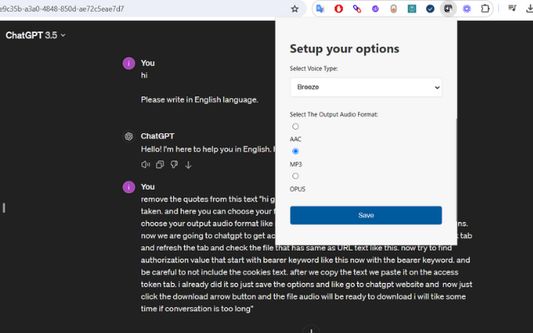
Save ChatGPT voice responses directly to your computer with a single click. This add-on adds a convenient download button next to ChatGPT's voice messages, allowing you to save the audio in your preferred format (AAC, MP3, or OPUS) and voice type. Perfect for language learners, content creators, or anyone who wants to revisit ChatGPT's spoken responses offline.
The extension is lightweight and integrates seamlessly with ChatGPT's interface. Simply click the download icon that appears next to voice messages to save them to your computer. You can customize your preferred voice type and audio format through the extension's options. Supports multiple languages and works on any ChatGPT conversation that includes voice responses.
The extension is lightweight and integrates seamlessly with ChatGPT's interface. Simply click the download icon that appears next to voice messages to save them to your computer. You can customize your preferred voice type and audio format through the extension's options. Supports multiple languages and works on any ChatGPT conversation that includes voice responses.
Betyg 5 av 1 recensent
Behörigheter och data
Nödvändiga behörigheter:
- Ladda ner filer och läsa och ändra webbläsarens nedladdningshistorik
- Åtkomst till dina data för platser i domänen chatgpt.com
Valfria behörigheter:
- Åtkomst till dina data för chatgpt.com
Mer information
- Länkar för tillägg
- Version
- 1.0.0
- Storlek
- 62,64 kB
- Senast uppdaterad
- för ett år sedan (9 apr 2025)
- Relaterade kategorier
- Licens
- MIT-licens
- Versionshistorik
- Lägg till i samling