
EasyTasker.io for Asana av Kickstart Extensions
EasyTasker.io for Asana, built by TeamKickstart.com.
4 användare4 användare
Metadata för tillägg
Skärmbilder




Om detta tillägg
EasyTasker.io for Asana, built by TeamKickstart.com
⚡ EasyTasker.io for Asana. Move fast. Stay focused.
EasyTasker turns what you are already working on into an organized Asana task, without making you stop and rebuild the context by hand.
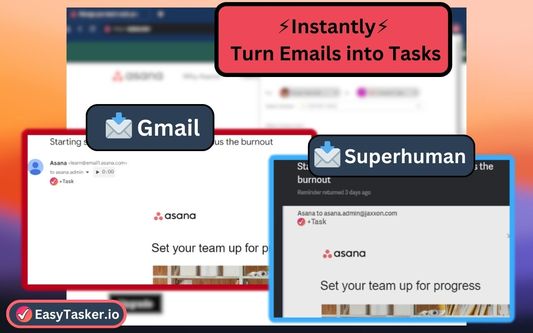
Save a tab, Gmail email, YouTube video, LinkedIn post, Facebook post, or post on X. You can also capture highlighted text or other webpages. It collects useful context such as the page title, link, selected content, screenshots, and attachments. Before creating the task, choose its project, section, dates, assignee, collaborators, tags, custom fields, and other details.
Need speed? Open the extension, use the floating task button, right-click selected content, or create a keyboard shortcut. Need focus? Use FocusList to bring important work into a browser sidebar, track time, complete tasks, and return to task details.
Scroll to WHAT'S NEW for the latest release notes.
🧰 WHAT YOU CAN DO
📝 WAYS TO CREATE A TASK
📚 SUPPORTED WORKFLOWS AND HELP
The extension also supports additional email, video, social, and general webpage workflows. For setup instructions, supported workflow guidance, and troubleshooting, visit:
https://easytasker.io/help-hub
📢 WHAT'S NEW — VERSION 1.99.43 — 09.04.26
🎉 NEW FEATURES
- Added a quicker way to add Asana tasks directly to FocusList from a task’s right-click or three-dot menu.
- Added section-specific reset controls for site-specific task buttons, allowing saved routing to be cleared without affecting other sites.
➕ IMPROVEMENTS
- Improved duplicate-task detection for multi-tab tasks, completed tasks, subtasks, similar titles, and URLs containing tracking parameters.
- Improved FocusList task search across Asana workspaces and made results more relevant to your selected project.
- Expanded task editing with better support for tags, collaborators, the current page, and multiple open tabs.
- Improved destination shortcut controls with consistent Reset, Update, and Remove actions.
- Added clearer explanations when project settings require a workspace selection.
- Improved disabled-site controls, including optional subdomain coverage and clearer feedback.
- Improved warning messages, error reporting, and general extension reliability.
🪲 FIXES
- Fixed the EasyTasker task button not appearing reliably on X.
- Fixed site-specific and right-click tasks being assigned the task-creation window’s default project.
- Fixed “Add to FocusList” sometimes reporting success when the task was not added.
- Fixed FocusList entries disappearing when a task was temporarily unavailable or inaccessible.
- Fixed right-clicking an Asana task sometimes adding the task already open in the detail pane instead.
- Fixed task creation from LinkedIn’s footer button failing to capture the post.
- Fixed invalid settings values that could prevent saved settings from loading correctly.
- Fixed Asana project, section, assignee, and custom-field dropdowns appearing empty in Firefox.
🗓 RECENT PROGRESS — PAST SIX MONTHS
Documented updates during the past six months have focused on a faster, clearer task-creation experience. Major improvements include reorganized settings, richer task controls, task history, duplicate detection, more reliable webpage capture, clearer upgrade guidance, and broader browser reliability.
📋 FULL CHANGELOG
See the complete curated update history at:
https://easytasker.io/changelog
⚡ EasyTasker.io for Asana. Move fast. Stay focused.
EasyTasker turns what you are already working on into an organized Asana task, without making you stop and rebuild the context by hand.
Save a tab, Gmail email, YouTube video, LinkedIn post, Facebook post, or post on X. You can also capture highlighted text or other webpages. It collects useful context such as the page title, link, selected content, screenshots, and attachments. Before creating the task, choose its project, section, dates, assignee, collaborators, tags, custom fields, and other details.
Need speed? Open the extension, use the floating task button, right-click selected content, or create a keyboard shortcut. Need focus? Use FocusList to bring important work into a browser sidebar, track time, complete tasks, and return to task details.
Scroll to WHAT'S NEW for the latest release notes.
🧰 WHAT YOU CAN DO
- Create a task from your current page without switching away from your work.
- Capture a single tab or save the open tabs in a browser window.
- Add selected text, page details, screenshots, markup, and file attachments.
- Route tasks to a chosen project and section.
- Set dates, an assignee, collaborators, tags, and custom fields.
- Create destination shortcuts for repeatable workflows.
- Reopen and edit recently created tasks from task history.
- Detect a possible duplicate and choose whether to update it or create a new task.
- Use FocusList to keep selected work visible, track time, and complete tasks.
- Disable the on-page button for sites where you do not want it displayed.
📝 WAYS TO CREATE A TASK
- Extension button
- Optional floating task button
- Right-click menu
- Keyboard shortcuts
- Task history and search
📚 SUPPORTED WORKFLOWS AND HELP
The extension also supports additional email, video, social, and general webpage workflows. For setup instructions, supported workflow guidance, and troubleshooting, visit:
https://easytasker.io/help-hub
📢 WHAT'S NEW — VERSION 1.99.43 — 09.04.26
🎉 NEW FEATURES
- Added a quicker way to add Asana tasks directly to FocusList from a task’s right-click or three-dot menu.
- Added section-specific reset controls for site-specific task buttons, allowing saved routing to be cleared without affecting other sites.
➕ IMPROVEMENTS
- Improved duplicate-task detection for multi-tab tasks, completed tasks, subtasks, similar titles, and URLs containing tracking parameters.
- Improved FocusList task search across Asana workspaces and made results more relevant to your selected project.
- Expanded task editing with better support for tags, collaborators, the current page, and multiple open tabs.
- Improved destination shortcut controls with consistent Reset, Update, and Remove actions.
- Added clearer explanations when project settings require a workspace selection.
- Improved disabled-site controls, including optional subdomain coverage and clearer feedback.
- Improved warning messages, error reporting, and general extension reliability.
🪲 FIXES
- Fixed the EasyTasker task button not appearing reliably on X.
- Fixed site-specific and right-click tasks being assigned the task-creation window’s default project.
- Fixed “Add to FocusList” sometimes reporting success when the task was not added.
- Fixed FocusList entries disappearing when a task was temporarily unavailable or inaccessible.
- Fixed right-clicking an Asana task sometimes adding the task already open in the detail pane instead.
- Fixed task creation from LinkedIn’s footer button failing to capture the post.
- Fixed invalid settings values that could prevent saved settings from loading correctly.
- Fixed Asana project, section, assignee, and custom-field dropdowns appearing empty in Firefox.
🗓 RECENT PROGRESS — PAST SIX MONTHS
Documented updates during the past six months have focused on a faster, clearer task-creation experience. Major improvements include reorganized settings, richer task controls, task history, duplicate detection, more reliable webpage capture, clearer upgrade guidance, and broader browser reliability.
📋 FULL CHANGELOG
See the complete curated update history at:
https://easytasker.io/changelog
Betyg 0 av 0 recensenter
Behörigheter och data
Nödvändiga behörigheter:
- Hämta data från urklipp
- Visa meddelanden till dig
- Åtkomst till webbläsarens flikar
- Åtkomst till webbläsarens aktivitet under navigering
- Åtkomst till dina data för alla webbplatser
Mer information
- Länkar för tillägg
- Version
- 1.99.43
- Storlek
- 3,03 MB
- Senast uppdaterad
- för 3 dagar sedan (4 sep 2026)
- Licens
- Med ensamrätt
- Versionshistorik
- Lägg till i samling
Utvecklaren av det här tillägget frågar att du kan hjälpa till att stödja den fortsatta utvecklingen genom att göra ett litet bidrag.