Last.FM Unscrobbler av guytepper
Delete multiple scrobbles from your Last.FM profile.
1 212 användare1 212 användare
Metadata för tillägg
Skärmbilder
Om detta tillägg
Last.FM does not allow deleting multiple scrobbles - only one at a time. Last.FM Unscrobbler adds this missing feature.
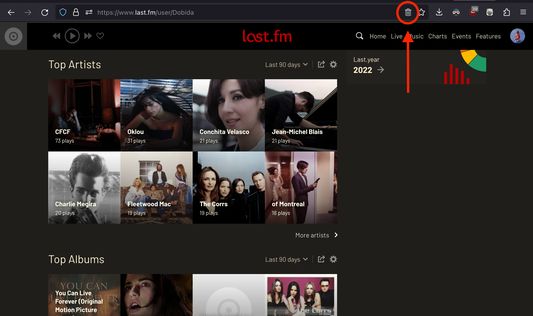
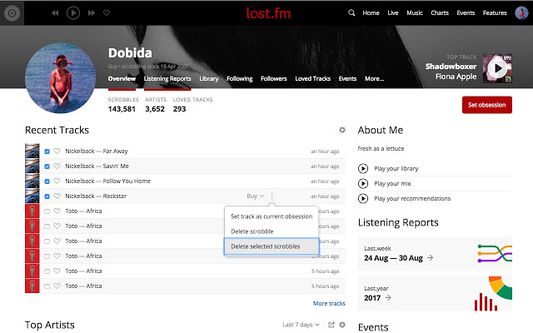
Simply click the extension icon from the address bar, tick the checkboxes near the scrobbles you want to delete, go to the track menu and press "Delete selected scrobbles".
NOTE: The extension trash bin icon will appear on the address bar (where the URL is) only when you visit Last.fm.
You have to click on this icon (and not on the toolbar extension icon) in order for the extension to run.
Simply click the extension icon from the address bar, tick the checkboxes near the scrobbles you want to delete, go to the track menu and press "Delete selected scrobbles".
NOTE: The extension trash bin icon will appear on the address bar (where the URL is) only when you visit Last.fm.
You have to click on this icon (and not on the toolbar extension icon) in order for the extension to run.
Betyg 4,3 av 25 recensenter
Mer information
- Länkar för tillägg
- Version
- 1.6.4
- Storlek
- 32,88 kB
- Senast uppdaterad
- för ett år sedan (15 apr 2025)
- Relaterade kategorier
- Versionshistorik
- Lägg till i samling