
Two-Finger History Jump av leonixyz
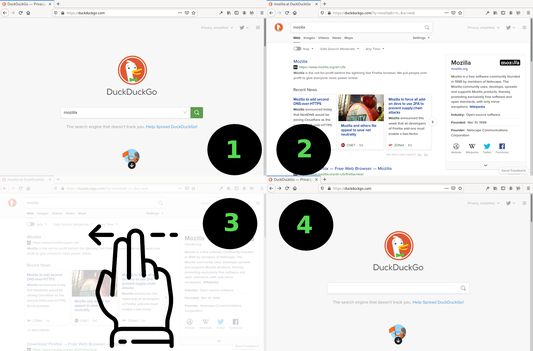
This add-on allows you to jump back/forward in the browser's history by swiping horizontally with two fingers on your touchpad. Swiping to the left will take you back one page, while swiping to the right will do the opposite.
225 användare225 användare
Metadata för tillägg
Skärmbilder
Om detta tillägg
This add-on allows you to jump back/forward in the browser's history by swiping horizontally with two fingers on your touchpad. Swiping to the left will take you back one page, while swiping to the right will do the opposite. It mimics the default behaviour on Mac OS. It needs the 'Access your data for all websites' permission in order to access the browser's local storage and be able to save its settings persistently.
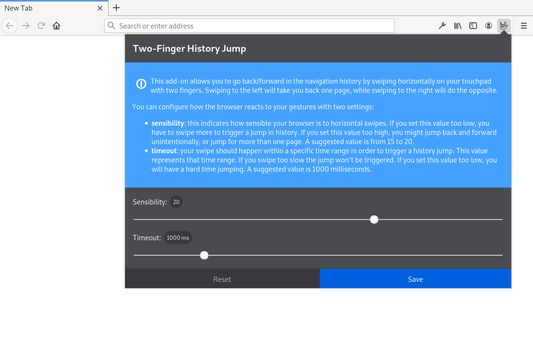
You can configure how the browser reacts to your gestures with three settings:
You can configure how the browser reacts to your gestures with three settings:
- sensibility: This indicates how sensitive your browser is to horizontal swipes. If you set this value too low, you have to swipe more to trigger a jump in history. If you set this value too high, you might jump back and forward unintentionally. 30 is the default and suggested values range from 10 to 50.
- timeout: The amount of time that the browser will wait before jumping back or forward. If you set this value too low, it will be more difficult to cancel accidental jumps. If you set this value too high, you might have to wait a long time before you can jump back or forward. 250 is the default and suggested value.
- deadzone: the amount of pixels that will be ignored when swiping. If you set this value too low you are more likely to trigger the animation by accident when scrolling.Note: for security reasons, Firefox doesn't allow webextensions to work on about:home (the default home page). Therefore, if you did not set a custom home page and happen to jump all the way back to about:home, this extension will appear to malfunction - in fact it's been blocked by Firefox, by design. You can read about how to circumvent this problem here
Betyg 4,1 av 27 recensenter
Behörigheter och data
Mer information
- Länkar för tillägg
- Version
- 2.0.1
- Storlek
- 598,6 kB
- Senast uppdaterad
- för 3 år sedan (9 mar 2023)
- Relaterade kategorier
- Versionshistorik
- Lägg till i samling
permission in order to access the browser's local storage and be able to save
its settings persistently.