Appstation Photo Camera Effect автор Applove
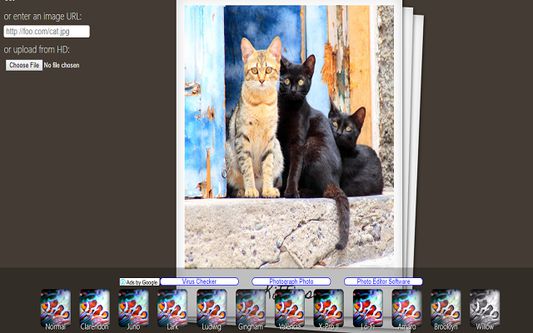
Appstation Photo Camera Effects 360 is a webapp shortcut for editing images exactly without a back-end. You can try it now. You can crop images. You can convert images. With just few clicks.
13 Users13 Users
Метадані розширення
Знімки екрана
Про це розширення
Appstation Photo Camera Effects 360 is a tool for editing images exactly without a back-end. You can try it now. You can crop images. You can convert images. With just few clicks. Add Filters to your image with just one single image editor extension.
Capabilities of Appstation Photo Camera Effect 360.
It is one of the finest Image Crop Tool. Gives you option to enter width and height to covert the image.
2. You can add filter to your image. Instagram, Snapchat and other app offer filters to make images look even better, So does this extension.
3. You can also add Post effects. There are 2 options available V-reserve and H-reverse.
4. You can also convert photo or image's size or quality. This means it is also a image compressor tool. There are 2 options Low quality if you want to decrease the file size of image.
How to Edit image, photo or pics using this tool
1. Click extension icon.
2. The tool will open in a new tab. Upload desired image here.
3. Select the changes you want.
4. Click save button.
5. Right click the edited image and save it on your system.
Capabilities of Appstation Photo Camera Effect 360.
It is one of the finest Image Crop Tool. Gives you option to enter width and height to covert the image.
2. You can add filter to your image. Instagram, Snapchat and other app offer filters to make images look even better, So does this extension.
3. You can also add Post effects. There are 2 options available V-reserve and H-reverse.
4. You can also convert photo or image's size or quality. This means it is also a image compressor tool. There are 2 options Low quality if you want to decrease the file size of image.
How to Edit image, photo or pics using this tool
1. Click extension icon.
2. The tool will open in a new tab. Upload desired image here.
3. Select the changes you want.
4. Click save button.
5. Right click the edited image and save it on your system.
Rated 3,7 by 6 reviewers
Більше інформації
- Посилання додатка
- Версія
- 1.0
- Розмір
- 11,38 КБ
- Востаннє оновлено
- 6 років тому (28 трав 2020 р.)
- Пов'язані категорії
- Ліцензія
- Громадська ліцензія Mozilla 2.0
- Історія версій
- Додати до збірки