
Patreon Easy Downloader автор Cosmious
Organize your favorite Patreon creators in one place. Download and manage your media ensuring they are uniformly and easily accessible. Focus on enjoying your content—not managing it. Never miss a file again.
Деякі функції можуть потребувати оплатиДеякі функції можуть потребувати оплати
1 086 Users1 086 Users
Метадані розширення
Знімки екрана



Про це розширення
Patreon Easy Downloader helps you organize and download files from Patreon creators in one simple interface.
Browse posts, bulk download Patreon content and minimize duplicates or missed files, without scrolling through endless feeds.
Get a clear picture of what's going on in all posts by eliminating the need to scramble for scattered content.
Ensuring that your data is properly arranged, you no longer have to race against the clock to receive your rewards before they disappear.
Filter & search exactly what you're looking for. No more hunting for download links hidden in a wall of content.
Focus on enjoying your content—not managing it.
🧾 How to Use
You can add your Patreon.com creators to the extension with 3 ways. Before adding your creators we suggest to complete these 3 things first:
1. Sign in to your Patreon.com account
2. Subscribe to a Patreon.com creator
3. Sign in to the browser extension within your browser
➤ The first way is automatic. Steps:
1. Visit the Patreon.com creator's home page
2. Click the browser extension (Home tab) and wait until the creator is detected
3. Click the 'Downloads Page' button when it appears. The creator will be added to your creator's list. It isn't required to have the Patreon.com page opened in your browser
➤ The second way is manual. Steps:
1. Click the browser extension and then click the 'Add creators' button
2. Type the creator's name in the search box and it will appear in the search results
3. Click the 'Add creator' icon next to the creator's name and it will be added to your creator's list
4. Click the 'Downloads Page' button (Home tab)
➤ The third way is also manual and it is available for users having browser extension version 300 and above. Steps:
1. Sign in to https://patreon.cosmious.com
2. Visit the My Creators page: https://patreon.cosmious.com/my-creators
3. The 'Add creators' section will appear
4. Type the creator's name in the search box and it will appear in the search results
5. Click the 'Add creator' icon next to the creator's name and it will be added to your creator's list
6. Click the 'Downloads Page' in the browser extension
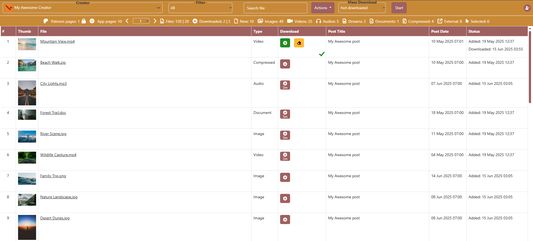
The 'Downloads Page' will gradually list the creator's available files.
🧩 Core features
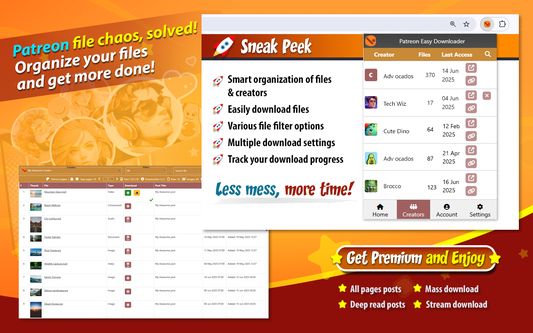
- List files from creator's posts
- Search & filter files by file type, post, state
- Download attachments (any media type) into organized folders
- Various download settings
- Multiple mass download options
- Track download progress
⭐ Premium features information
Users have the option to upgrade to a Premium plan for one or more creators and enhance their experience within the extension.
Details about the Premium features, including their benefits and functionalities, are available on our website.
🌐 Visit https://patreon.cosmious.com for more information.
Browse posts, bulk download Patreon content and minimize duplicates or missed files, without scrolling through endless feeds.
Get a clear picture of what's going on in all posts by eliminating the need to scramble for scattered content.
Ensuring that your data is properly arranged, you no longer have to race against the clock to receive your rewards before they disappear.
Filter & search exactly what you're looking for. No more hunting for download links hidden in a wall of content.
Focus on enjoying your content—not managing it.
🧾 How to Use
You can add your Patreon.com creators to the extension with 3 ways. Before adding your creators we suggest to complete these 3 things first:
1. Sign in to your Patreon.com account
2. Subscribe to a Patreon.com creator
3. Sign in to the browser extension within your browser
➤ The first way is automatic. Steps:
1. Visit the Patreon.com creator's home page
2. Click the browser extension (Home tab) and wait until the creator is detected
3. Click the 'Downloads Page' button when it appears. The creator will be added to your creator's list. It isn't required to have the Patreon.com page opened in your browser
➤ The second way is manual. Steps:
1. Click the browser extension and then click the 'Add creators' button
2. Type the creator's name in the search box and it will appear in the search results
3. Click the 'Add creator' icon next to the creator's name and it will be added to your creator's list
4. Click the 'Downloads Page' button (Home tab)
➤ The third way is also manual and it is available for users having browser extension version 300 and above. Steps:
1. Sign in to https://patreon.cosmious.com
2. Visit the My Creators page: https://patreon.cosmious.com/my-creators
3. The 'Add creators' section will appear
4. Type the creator's name in the search box and it will appear in the search results
5. Click the 'Add creator' icon next to the creator's name and it will be added to your creator's list
6. Click the 'Downloads Page' in the browser extension
The 'Downloads Page' will gradually list the creator's available files.
🧩 Core features
- List files from creator's posts
- Search & filter files by file type, post, state
- Download attachments (any media type) into organized folders
- Various download settings
- Multiple mass download options
- Track download progress
⭐ Premium features information
Users have the option to upgrade to a Premium plan for one or more creators and enhance their experience within the extension.
Details about the Premium features, including their benefits and functionalities, are available on our website.
🌐 Visit https://patreon.cosmious.com for more information.
Rated 2,6 by 19 reviewers
Permissions and data
Необхідні дозволи:
- Завантажувати файли, а також читати й змінювати історію браузера
- Отримувати доступ до вкладок браузера
- Отримувати доступ до ваших даних для patreon.cosmious.com
Необов'язкові дозволи:
- Показувати сповіщення
- Отримувати доступ до ваших даних для вебсайтів у домені patreon.com
- Отримувати доступ до ваших даних для вебсайтів у домені patreonusercontent.com
- Отримувати доступ до ваших даних для вебсайтів у домені googleapis.com
- Отримувати доступ до ваших даних для patreon.cosmious.com
- Отримувати доступ до ваших даних для drive.google.com
- Отримувати доступ до ваших даних для accounts.google.com
Більше інформації
- Посилання додатка
- Версія
- 312
- Розмір
- 697,79 КБ
- Востаннє оновлено
- 14 днів тому (21 бер 2026 р.)
- Пов'язані категорії
- Ліцензія
- Усі права захищені
- Політика приватності
- Ознайомитись з політикою приватності для цього додатка
- Історія версій
- Додати до збірки