Додатки браузера Firefox
  • Розширення
  • Теми
    • для Firefox
    • Словники та локалізації
    • Інші сайти браузера
    • Додатки для Android
Увійти
Перегляд Two-Finger History Jump

Two-Finger History Jump автор leonixyz

This add-on allows you to jump back/forward in the browser's history by swiping horizontally with two fingers on your touchpad. Swiping to the left will take you back one page, while swiping to the right will do the opposite.

4 (28 reviews)4 (28 reviews)
260 Users260 Users
Завантажити Firefox та отримати розширення
Завантажити файл

Метадані розширення

Знімки екрана
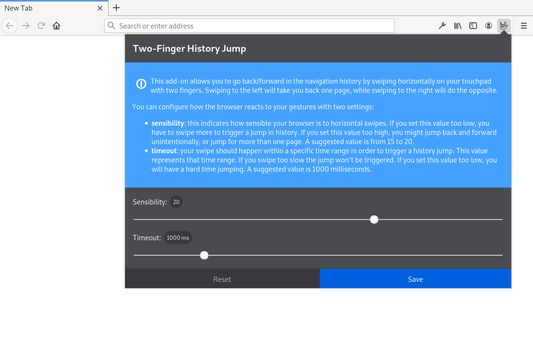
The settings for this add-on allows you to customize how your browser reacts to gestures.Swiping left with two fingers takes you back one page.
Про це розширення
This add-on allows you to jump back/forward in the browser's history by swiping horizontally with two fingers on your touchpad. Swiping to the left will take you back one page, while swiping to the right will do the opposite. It mimics the default behaviour on Mac OS. It needs the 'Access your data for all websites' permission in order to access the browser's local storage and be able to save its settings persistently.

You can configure how the browser reacts to your gestures with three settings:
  • sensibility: This indicates how sensitive your browser is to horizontal swipes. If you set this value too low, you have to swipe more to trigger a jump in history. If you set this value too high, you might jump back and forward unintentionally. 30 is the default and suggested values range from 10 to 50.
  • timeout: The amount of time that the browser will wait before jumping back or forward. If you set this value too low, it will be more difficult to cancel accidental jumps. If you set this value too high, you might have to wait a long time before you can jump back or forward. 250 is the default and suggested value.
  • deadzone: the amount of pixels that will be ignored when swiping. If you set this value too low you are more likely to trigger the animation by accident when scrolling.Note: for security reasons, Firefox doesn't allow webextensions to work on about:home (the default home page). Therefore, if you did not set a custom home page and happen to jump all the way back to about:home, this extension will appear to malfunction - in fact it's been blocked by Firefox, by design. You can read about how to circumvent this problem here
Коментарі розробника
It needs the 'Access your data for all websites'
permission in order to access the browser's local storage and be able to save
its settings persistently.
Rated 4 by 28 reviewers
Увійдіть, щоб оцінити це розширення
Ще немає оцінок

Рейтинг збережено

5
16
4
5
3
2
2
1
1
4
Читати всі 28 відгуків
Permissions and data

Необхідні дозволи:

  • Отримувати доступ до ваших даних для всіх вебсайтів
Докладніше
Більше інформації
Посилання додатка
  • Домашня сторінка
  • Сайт підтримки
  • Електронна пошта підтримки
Версія
2.0.1
Розмір
598,6 КБ
Востаннє оновлено
3 роки тому (9 бер 2023 р.)
Пов'язані категорії
  • Інше
Ліцензія
Лише Загальна громадська ліцензія GNU v3.0
Історія версій
  • Переглянути всі версії
Додати до збірки
Повідомити про цей додаток
Перейти на домівку Mozilla

Додатки

  • Про
  • Блог додатків Firefox
  • Семінар з розширень
  • Центр розробника
  • Політики розробників
  • Блог спільноти
  • Форум
  • Повідомити про помилку
  • Настанови з написання відгуків

Браузери

  • Desktop
  • Mobile
  • Enterprise

Продукти

  • Browsers
  • VPN
  • Relay
  • Monitor
  • Pocket
  • Bluesky (@firefox.com)
  • Instagram (Firefox)
  • YouTube (firefoxchannel)
  • Приватність
  • Файли cookie
  • Правові положення

За винятком випадків зазначених тут, вміст цього сайту ліцензовано на умовах ліцензії Creative Commons Attribution Share-Alike License v3.0, або будь-якою новішою версією.